CloudShell Release History
Version 2026.2
Repeating "Sandbox Ending" Email
The Before end email notification can now repeat until the sandbox ends. In the Reserve dialog or the sandbox Properties, select Before end, then select and again every and set an interval (minimum 15 minutes). The sandbox owner and permitted users keep getting the reminder at that interval until the sandbox ends.
The Python and XML-RPC TestShell API methods CreateReservation, CreateImmediateReservation, CreateTopologyReservation and CreateImmediateTopologyReservation accept a new optional notificationRepeatMinutes parameter (0 = no repeat, otherwise at least 15). The parameter isn't available in the TCL and C# API clients.
Available in CloudShell 2026.2.0.34 and later.
Minimum Lead Time in Resource Manager
A domain's minimum lead time can now be viewed and set in Resource Manager, in the Min. Lead Time field on the domain's Properties page, instead of only through the Admin REST API. Enter the number of minutes; the text under the field describes the effect. See Minimum Lead Time. Available in CloudShell 2026.2.0.34 and later; 2026.1 releases up to and including 2026.1.0.102 don't include it.
SQL Server to PostgreSQL Migration Tool Included
The CloudShell installation package now includes the SQL Server to PostgreSQL migration tool, in CloudShell\Utilities\SqlServerToPostgresqlMigrator, with a README. See Migrating the Databases from SQL Server to PostgreSQL. Available in CloudShell 2026.2.0.34 and later.
Approval Group Notifications Limited to Administrators
Only system administrators (any group) and domain administrators (groups in their current domain) can set When new approval request created, notify users with group on a blueprint. A group that is already set is kept when other users edit the blueprint. The new Quali Server key DisableApprovalGroupNotifications (default false) hides the option and stops group notification emails. Available in CloudShell 2026.2.0.34 and later.
Secrets Redacted from CloudShell Monitor Log Packages
Log packages created by CloudShell Monitor now include redacted copies of the configuration files, with passwords, secrets, private keys and connection-string passwords masked. Available in CloudShell 2026.2.0.34 and later.
Execution Server Driver Environments Keep Their Seed Packages
When creating a driver environment, the Execution Server now sets VIRTUALENV_NO_PERIODIC_UPDATE=1, so virtualenv no longer downloads newer pip and setuptools in the background. This prevents environments from picking up setuptools versions that break drivers (for example, a missing pkg_resources). Set VIRTUALENV_NO_PERIODIC_UPDATE=0 on the Execution Server host to restore the previous behavior.
Docker Execution Server Per-Release Tag
Each Docker Execution Server release is also tagged with its release number, for example qualihub/executionserver:2026.2, which always points to the newest 2026.2 image.
Security Updates
Node.js, used by the Sandbox API Gateway and Server Proxy, was updated from 24.14.0 to 24.22.1 (Node.js October 2026 security release). Available in CloudShell 2026.2.0.34 and later.
Bug Fixes
- Fixed the domain minimum lead time being enforced in seconds rather than minutes for reservations made through the API. A domain set to 60 now requires sandboxes to start at least 60 minutes ahead, as the Portal already showed. (2026.2.0.34)
- Fixed
GetReservationDetailstiming out on sandboxes with many resources. Resource details are now queried more efficiently. (2026.2.0.34) - Fixed diagram connection lines staying attached to the old card size after changing the View Style, with
PreserveDiagramLayoutOnViewStyleChangeenabled. (2026.2.0.34) - Fixed Save as Blueprint failing for a work-order sandbox with connected routes or cables. (2026.2.0.34)
- Fixed the Drivers tab being hidden in Resource Manager for resource models that have parent models. (2026.2.0.34)
- The Activity Feed All Components filter now lists components in natural alphabetical order instead of diagram order. (2026.2.0.34)
- Fixed the sandbox diagram occasionally staying on LOADING. (2026.2.0.34)
ServiceExtension.dllandGenericServiceExtension.dllnow show the CloudShell version as their file version. Their assembly version is unchanged (2.0.0.0). (2026.2.0.34)- Fixed the App Orchestration package (1.0.1) on Python 3.13 Execution Servers. (2026.2.0.34)
- Fixed reserving a sandbox failing with
User "..." does not existwhen the owner's username contains non-ASCII characters, such as accented letters or Japanese characters. - Fixed a custom logo override (
customer_override.css) not being applied on the page shown after switching domain. - Fixed the Connect All VLAN service script on Python 3 Execution Servers; the installer now ships the current Networking and Sandbox Orchestration packages.
Version 2026.1
Blueprint Export/Import via the Automation API
New ExportBlueprint(topologyNames[]) and ImportBlueprint(blueprintXml) Automation API methods. Blueprints are exchanged as plain XML text, suitable for tracking in git — export is deterministic. The import payload cannot carry data models, drivers, scripts, inventory resources, or category definitions. Permissions match those for creating/editing a blueprint in the portal; no system-administrator role is required.
Paginated Owner / Permitted Users Pickers in the Reserve Dialog
For large domains, the Owner and Permitted Users pickers in the Reserve dialog now use a server-side, domain-scoped, 50-per-page type-ahead search instead of loading every domain user up front, which was slow for administrators in large domains. A "type to search for more" affordance was added, and domain-group ordering was fixed.
Maintenance Window By Domain
Administrators can define maintenance windows scoped to individual domains. This enables planned downtime or restricted access for specific teams without affecting other domains.
Deprecate Properties Capability — All Standards
The deprecate_properties capability is now recognized across all CloudShell resource standards. Previously only supported on a subset of core standards.
Security Updates
Updated bundled third-party components:
| Component | Previous | New |
|---|---|---|
| Apache httpd (+OpenSSL) | 2.4.65 | 2.4.66 |
| Node.js | 22.15.0 | 24.14.0 (LTS) |
| Erlang OTP | 25.2.3 | 26.2.3 |
| MongoDB | 6.0.4 | 7.0.30 |
Node.js 24 dropped 32-bit (x86) Windows support. The x86 Node.js prerequisite has been removed from the installer.
Also fixed: an XML External Entity (XXE) vulnerability (CWE-611) on the Portal's SAML assertion consumer service endpoint, which could be reached without authentication. Deployments using SSO/SAML should upgrade.
Export Diagram as PNG
Export sandbox diagrams as PNG images directly from the browser. Available in the diagram toolbar under Export → PNG.
AI Chat Integration
Configurable AI Assistant menu item in the Portal. Administrators can set a URL template to integrate with AI chat services.
Portal Session Resilience
Portal users — including those signing in via SSO/SAML — are no longer logged out when the Portal application pool recycles. CloudShell rebuilds the session from the existing sign-in cookie, so open tabs and background page refreshes keep working without a forced re-login, and a transient CloudShell Server outage no longer signs users out. Controlled by the EnableSessionRehydration setting (enabled by default).
Custom PyPI Repository Honored at Execution Server Setup
A configured custom PyPI repository (RequirementsRepository, RequirementsTrustedHost, RequirementsExtraRepository) is now used during Execution Server setup and default-environment bootstrap, not only when running driver commands. Environments with a private or HTTPS-only PyPI index can complete Execution Server setup against a reachable custom index without a workaround.
Server Default Changes
UseRabbitServernow defaults tofalseUseEmbeddedSandboxServicenow defaults tofalse- Job Scheduling now follows the global
UseRabbitServersetting instead of an independent default, so scheduled and manually launched reservations take the same messaging path
Docker Execution Server
- Consolidated Dockerfile with Python 3 virtualenv and TLS/Kerberos compatibility
- Support for passing Execution Server Selector attributes to Docker containers
Application Links Management API
New TestShell API methods for managing application links (SSH, Telnet, RDP, etc.) on resources programmatically. Administrators can disable specific links per resource or set family-wide defaults:
SetResourceApplicationLinks— Set which application links are disabled for a specific resourceGetResourceApplicationLinks— Get the current application links configuration for a resourceSetFamilyDefaultApplicationLinks— Set default disabled links for an entire resource familyGetFamilyDefaultApplicationLinks— Get the family-level default configuration
GetResourceReservations API
New TestShell API method that returns the list of reservations (current and historical) associated with a given resource.
Python Automation Package Updated
GetResourceReservations, GetResourceApplicationLinks, SetResourceApplicationLinks, GetFamilyDefaultApplicationLinks, and SetFamilyDefaultApplicationLinks are now exposed in the generated Python automation package, alongside the existing TestShell (.NET) API.
Improved Abstract Resource Resolution Diagnostics
When a blueprint reservation fails due to unresolvable abstract resources or route conflicts, the error message now includes detailed diagnostics — showing which resources could not be resolved, which routes failed, and the specific conflicts that prevented resolution.
Preserve the Diagram Arrangement When the View Style Changes
Changing a diagram's View Style can now resize the resource cards in place and keep the saved arrangement, instead of applying the legacy per-axis resize (Large ×2/×3, Small ÷2.7 and ×1.3) that visibly displaces resources and link endpoints. This is opt-in — set PreserveDiagramLayoutOnViewStyleChange to True in the Portal's customer.config; the default is unchanged behavior.
Independently of that setting, three flows that could move or persist diagram coordinates incorrectly were fixed: Arrange, dragging resources to new positions, and resizing a sticky note.
Execution Server Resilience on Linux
Execution Servers running on Linux/Mono handle bursts of driver launches more reliably. Under a burst, reads from driver child processes could starve the socket-completion callbacks that service the Execution Server's messaging channel, wedging the agent until it was restarted. The Execution Server now reserves a floor of thread-pool worker threads at startup so the two cannot compete, and CloudShell Server tolerates a much longer transient stall — up to roughly 100 seconds — when dispatching an execution request to an Execution Server, instead of giving up after a few seconds.
Also fixed: virtual environments on Linux Execution Servers were resolved using the Windows interpreter path layout (Scripts rather than bin).
Driver Command Queue Inspection and Recovery API
New system-administrator Automation API methods for seeing which resource driver commands are queued or running, and cancelling them. They address a resource left blocked by a command belonging to a previous — possibly already ended — sandbox, which a new sandbox could not previously see or cancel:
GetRunningCommands— the driver commands queued or running in a reservation.GetResourceCommandExecutions— the driver commands queued or running on a resource, across all reservations.CancelResourceCommand— cancel one command by its execution id.ClearResourceCommands— cancel every command queued or running on a resource. Does not wait behind the command it is clearing, so it can be called from a Setup script.
For details and examples, see Inspecting and Clearing Driver Commands on a Resource.
Sandbox Owners and Permitted Users Accepted by Display Name
Creating a sandbox could fail with User "<name>" does not exist for a user who did exist, when that user's display name differed from their username — most often for users provisioned through SSO or Active Directory, where the directory supplies a display name such as Jane Doe (Engineering) while the login remains jdoe. Sandbox owners and permitted users may now be given as a user ID, a username, or a display name.
Usernames are matched first, so no existing behavior changes. Because display names are not required to be unique, a display name shared by more than one user is rejected rather than resolved arbitrarily, and the error asks for the username instead. Permissions are unchanged — a user resolved this way must still be allowed to own a sandbox in the relevant domain.
Bundled Python 3 Upgraded to 3.13 (Windows)
The Python 3 interpreter bundled with CloudShell on Windows has been upgraded from CPython 3.9.9 (32-bit) to 3.13.15 (64-bit). Shell drivers and orchestration scripts that run on a Windows Execution Server now execute on Python 3.13. The bundled Python 2.7.18 slot is unchanged and still ships, so legacy Python 2 shells are unaffected.
Driver code and its requirements.txt must be valid on Python 3.13. Modules and aliases removed between 3.9 and 3.13 are the most common cause of breakage — for example the collections aliases for the abstract base classes (collections.Sequence), which were removed in Python 3.10 and must be imported from collections.abc instead. Test your shells against Python 3.13 before upgrading.
This upgrade covers the Python bundled with CloudShell on Windows. Linux Execution Servers — including the Linux virtual appliance and the Docker Execution Server image — still provide Python 3.9.9. If your shells run on both Windows and Linux Execution Servers, keep driver code compatible with both 3.9 and 3.13.
Global Inputs Kept When Saving a Sandbox as a Blueprint
Saving a sandbox as a blueprint now keeps global inputs that were linked to a resource requirement, instead of dropping them:
- Where the requirement is carried over to the saved blueprint (the work order flow), the kept global input is linked back to that requirement, so it still drives something.
- Where the resource was pinned down as a concrete resource, there is nothing left to link to, so the input is kept as a plain value.
Controlled by two customer.config keys, both defaulting to true: KeepResourceGlobalInputsOnSaveAsBlueprint (keeps the input) and RelinkGlobalInputsOnSaveAsBlueprint (re-links a kept input to a carried-over requirement). Set either to false to restore the previous behavior.
Blueprint Import Validates Categories
Importing a blueprint that references a category that does not exist in the target domain now fails the import with an explicit error, instead of importing the blueprint and silently dropping the category association. This completes the import validation set — family, model, attribute, script, driver and resource references already failed the import when missing.
Optimistic Abstract Resource Resolution (Opt-In)
A new plugable solver architecture can resolve abstract resource requirements outside the global abstract-resolution lock, using a generation counter with optimistic commit, bounded retry, and pessimistic fallback — improving throughput under concurrent load. Controlled by the AbstractResolutionStrategy setting (Legacy or Optimistic; default Legacy, unchanged behavior). To try it, set AbstractResolutionStrategy=Optimistic in the CloudShell Server customer.config and restart the service.
Optimistic Network Route Resolution (Opt-In)
Network routes can likewise be resolved outside the global abstract lock, using the same optimistic-commit-with-fallback approach — measured at roughly 2.3× route-resolution throughput (283 ms → 124 ms at 4×15 concurrency) in testing. Controlled by the NetworkRouteResolverStrategy setting (Legacy or Optimistic; default Legacy, unchanged behavior). To try it, set NetworkRouteResolverStrategy=Optimistic in customer.config and restart the service.
"Blueprint not found" Message No Longer Loops on Domain Switch
Switching the active domain while a blueprint that doesn't exist in the new domain is open used to repeat the Blueprint not found message indefinitely, blocking the redirect until the page load was stopped manually. The message is now shown once and you're redirected to the blueprint catalog of the new domain.
Available in CloudShell 2026.2.0.190036 and later. 2026.1 releases up to and including 2026.1.0.102 don't include this fix.
Bug Fixes
- Fixed Save as Blueprint failing with an error when the blueprint a sandbox was originally created from had since been deleted. Global inputs are now read from the sandbox itself, so the save succeeds.
- Fixed diagram PNG export hanging indefinitely on a "Please Wait" indicator in deployed builds. A required library was present in source but not marked as deployable content, so it 404'd in published builds; export now fails gracefully if the library is unavailable rather than hanging.
- Fixed abstract resource resolution (QAC) failing on large inventories once the candidate-parent count exceeded 1024-clause query limit. Resolution now uses a single path-hierarchy terms query regardless of parent count, and real Elasticsearch failures are now surfaced instead of a misleading "wrong result type" error.
- Fixed
FindResourcestiming out on large inventories. Resource-summary retrieval now serves from Elasticsearch instead of a heavy 5-table join. - Fixed saving a persistent-sandbox reservation failing with a
UtcDateTime expect date kind Utc but it is Unspecifiederror. - Fixed editing a sticky note's text resetting its color to null and failing to save. Color is now only changed when one is explicitly provided.
- Fixed route breadcrumbs accumulating on repeated abstract resolve/unresolve. Unresolving now cleans up its port-level breadcrumb, and Select Connection replaces the endpoint's current route instead of accumulating routes.
- Fixed a
NullReferenceExceptionwhen deleting a saved app that has no cloud provider; such apps are now skipped instead of throwing. - Fixed an issue where App deployment could retry unnecessarily on certain internal errors instead of failing fast with clear diagnostics.
- Fixed SSO (SAML) users being bounced to the login page in a loop, instead of seeing the maintenance page, when signing in during a maintenance window. Aborted logins no longer leave a half-authenticated session.
- Fixed an active maintenance window being left stranded open when its end time was edited to a past time. Such edits are now rejected — use Stop to end an active window immediately.
- Fixed the RabbitMQ messaging service failing to start after an Erlang upgrade. CloudShell now validates and refreshes stale Erlang location settings automatically.
- Fixed abstract resource port names in Assembly Lab work order fields and route tooltips intermittently truncating to the leaf port name instead of the full path.
- Fixed the Sandbox API crashing on the Node.js 24 runtime when handling conditional (cache-revalidation) requests to the explore endpoints.
- Restored the full Ansible package (with bundled collections) in the Docker Execution Server image, fixing playbooks that failed with missing-module errors.
- The About dialog now shows the full four-part product version, including the build number (for example,
2026.1.0.52). - Fixed a resource placed directly into a blueprint being labeled with its own name twice on the sandbox diagram — for example
server1 (server1)instead ofserver1. A resource that does resolve an abstract still shows that abstract's alias, and where an abstract's alias is identical to the resource name the diagram now shows the name once, matching the resource side pane. - Fixed a server error (HTTP 500) when downloading a shell or provisioning script whose stored file name has no extension.
- Fixed the sandbox Properties dialog showing a non-admin user an end time the sandbox does not have, for a sandbox that had been extended beyond the duration cap of its blueprint or user group. The dialog now shows the sandbox's real schedule, and opening it no longer silently shortens the sandbox.
Version 2025.1
RemoveEntitiesFromTopology API
New API method for programmatically removing services and abstract resources from a topology/blueprint.
PostgreSQL Database Support (Beta)
CloudShell now supports PostgreSQL as an alternative database backend. Contact Quali Support for evaluation access.
Post-2024.1 GA Patch Releases
2024.1.0.2534 (October 2024)
- Route and Cable Connectivity Events (added in 2024.1.0.2529) — Four new publishable server events,
SandboxRouteConnected,SandboxRouteDisconnected,SandboxCableConnectedandSandboxCableDisconnected, let MQ subscribers react to connectivity changes in a sandbox. See CloudShell Server Events Queue - Abstract Editor: Collapse Nodes — Collapse abstract nodes in the diagram editor for cleaner visualization
- Reservation State Filter — Now visible for all domain types in the Reservations Dashboard
- L1 Port Filter — Filter resources by L1 ports when adding resources to a reservation
- Block Recurring Sandboxes in Assembly Lab — Recurring reservations are blocked in Assembly Lab domains
2024.1.0.2540 (November 2024)
- Sticky Notes Activity Feed — When updating sticky notes, a notification appears in the reservation activity feed
- Work Order Enhancements — Block connectivity changes in pending state; show full abstract port names in Blueprint route editor
2024.1.0.2596 (February 2025)
- Attribute Changed Event — Now publishable for MQ integration
- SSO Login Event — Login events are now created for SSO logins
- Sandbox API: Schedule Future Reservations — New
Start_Timeparameter to schedule reservations for a future time - Save As Template Confirmation — Confirmation dialogs added for "Save As Template" and "Save a Copy" actions
- Work Order Improvements — Recursive state updates, alphabetical route sorting, sort resources by request name
- Domain ID in Events — Domain ID now passed in certain events to simplify handling
2024.1.0.2603 (March 2025)
- Copiable Side Panel Text — Text in side panels (activity feed, resource info) is now selectable and copiable
- Sandbox API: Cancel Pending Reservation — API now supports canceling pending reservations, not just stopping active ones
- Assembly Lab: Exclusive Requirements — Exclusive requirements now solved only by the device itself, not the entire graph
- Performance Improvements — Faster entity path queries, optimized published properties retrieval
2024.1.0.2624 (April 2025)
- Smart Route Creation — When creating routes between concrete devices, the system prioritizes using existing L1 infrastructure segments (patch panels, Layer 1 switches). Falls back to a provisional direct connection if no valid route exists
- Node.js Upgrade — Bundled Node.js upgraded from 18.13.0 to 22.15.0
- Security: L1 Driver Logs — Passwords redacted from Layer 1 driver logs
- Performance — Reduced CPU usage, faster resource deletion, reduced thread starvation, caching for high-frequency calls
2024.1.0.2634 (May 2025)
- PostgreSQL Support (Experimental) — Experimental database support for PostgreSQL. Contact Quali Support for details.
2024.1.0.2650 (June 2025)
- Sticky Note Colors — Choose color for sticky notes in sandboxes
- New API: UndeployApps — Remove an app from the cloud provider while keeping the CloudShell resource. Useful for bulk deletion scenarios.
2024.1.0.2669 (July 2025)
- AllowUnicodeForCommandContext — New configuration option to support passing unicode characters to script environment variables (useful when usernames contain unicode)
2024.1.0.2682 (August 2025)
- Alias in Assembly Lab — Resource alias now appearing in Assembly Lab reservations
- Environment Variable Config Override — Override
customer.configvalues using environment variables - Permissions Screen Sort — Groups sorted alphabetically in the Permissions screen
- Connection Properties — Side panel shows changes immediately after modification
2024.1.0.2686 (October 2025)
- L1 Port Route Solving — When solving an abstract in a route, if the solution is connected to an L1 port, the port is automatically added to the route
- Per-Domain Notification Settings API — New
UpdateDomainSettingandGetDomainSettingsAPI methods for managing notification settings per domain
Version 2024.1
Assembly Lab
A radically different mode of operation for CloudShell is now available!
-
Manage devices on a part by part basis
- Move sub resources from one device to another
- Solve abstracts using parts from different devices
-
Sandboxes can be partially solved by algorithm and partially by human involvement
- Select solutions for abstract requests
- Change solutions
For more information on Assembly lab, follow these links
Capabilities
CloudShell's RBAC implementation, you can now associate user groups with capability sets. Each capability set can specifically allow or block certain capabilities, overriding the defaults provided by the group role.
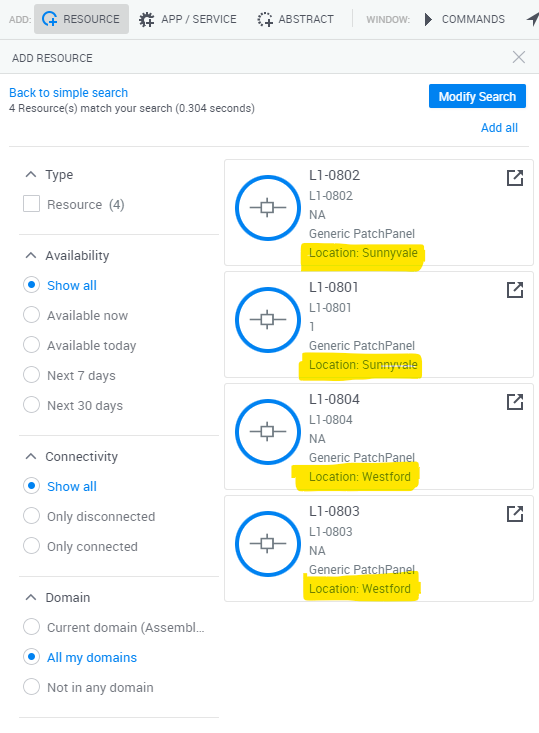
Display attributes in Resource Search directly on cards
Configure specific attributes to appear directly on resource search results.
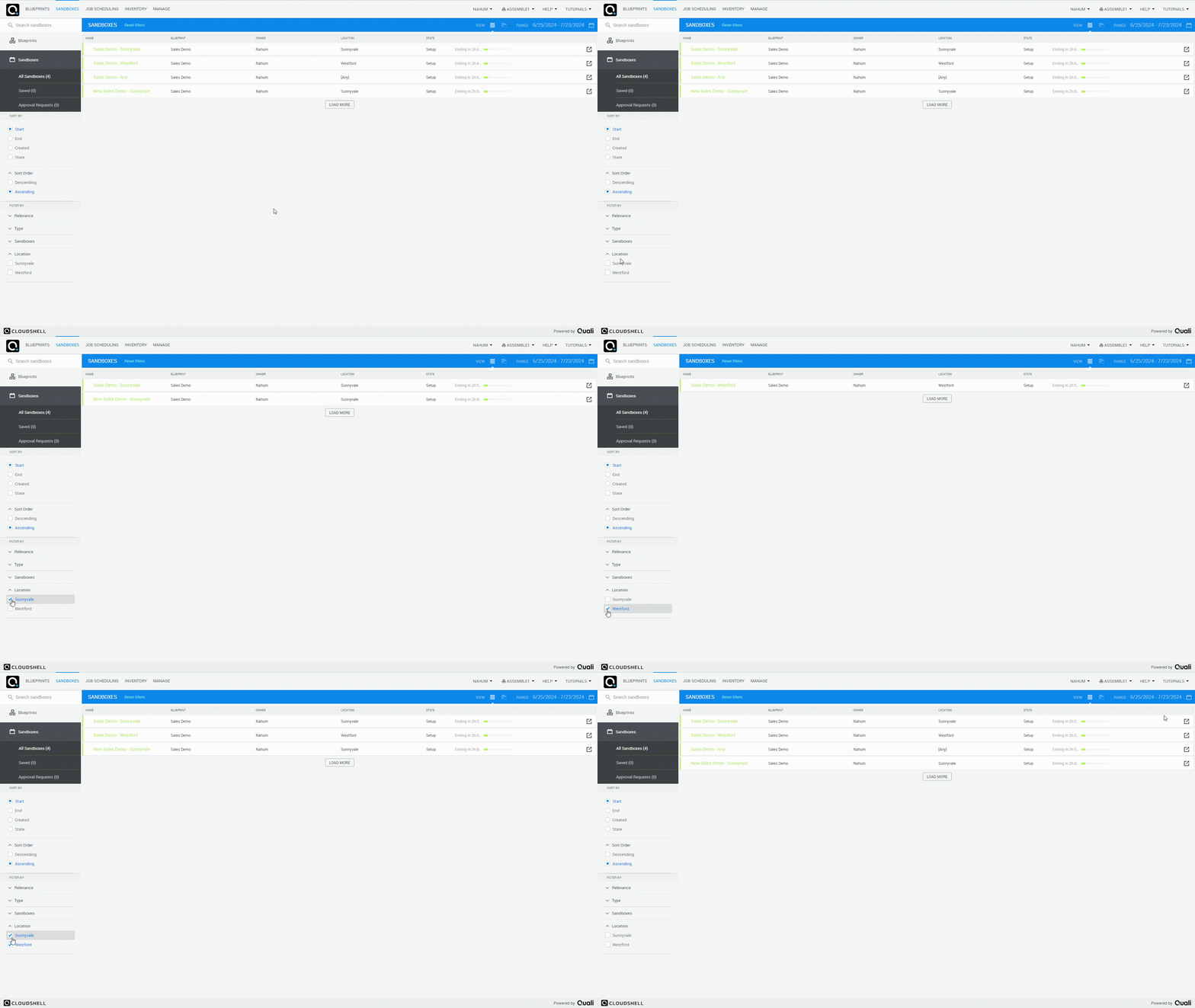
Filter sandboxes by user input and display the user input in Sandboxes Dashboard
- Configure an attribute to be displayed in sandbox dashboard
- Show only sandboxes which passed a particular value
Minimum Lead Time
You now have the ability to establish a minimum lead time for reserving Sandboxes within a specific domain. This means that when this setting is configured, any sandbox reservations must be made for a date in the future, not for immediate use.
To implement this, you need to adjust the MinimumLeadTimeMinutes parameter via a specific API call. Detailed instructions on how to make this API call can be found in this guide.
API Changes
GetResourcesAttributeValues
Receives a list of resources and returns the values of all the attributes in bulk. This method can be more performant than calling GetResourceAttributeValues or GetResourceDetails in a loop. Available in Cloudshell Automation API.
GetExecutionServers & DeleteExecutionServer
API calls for getting Execution Servers and removing them using automation.
GetResourceDetails changes
GetResourceDetails will now show Create & Modified Date for the resource.